
Download Fit AI Images – AI Body Visualization Tool for Fitness Motivation
Overview
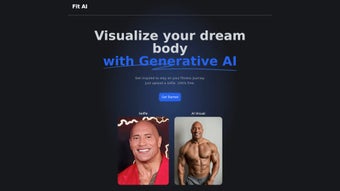
Fit AI Images is a free, web‑based application that harnesses generative artificial intelligence to help users picture their ideal physique before they even hit the gym. By uploading a simple selfie, the platform creates a realistic, side‑by‑side visual of how the user might look after reaching specific fitness milestones. The service is powered by cutting‑edge AI models from Replicate, hosted on Vercel, and designed to motivate people by turning abstract goals into concrete images.
Whether you’re a beginner looking for a confidence boost, a seasoned athlete visualizing the next level of muscle definition, or simply someone curious about the possibilities of AI in personal health, Fit AI Images provides an engaging, secure, and instantly accessible way to explore “what‑could‑be.” The tool emphasizes privacy—photos are processed on the server and are not stored long‑term—so users can experiment without fear of data misuse. In short, Fit AI Images blends technology and wellness, offering a free, easy‑to‑use visual aid that keeps you inspired throughout every rep, set, and cardio session. Additionally, the platform’s responsive design means it works flawlessly on desktop monitors, laptops, tablets, and smartphones, ensuring that you can access your visual projections anytime, anywhere, without the need for bulky installations or costly software licenses.
By delivering instant, personalized feedback, Fit AI Images helps bridge the gap between goal‑setting and tangible progress, making it an indispensable companion for anyone serious about achieving lasting fitness results.
Key Features
- AI‑Generated Body Projections: Turn a single selfie into multiple body‑type visualizations based on selected fitness goals.
- Goal‑Specific Filters: Choose from “lean,” “muscular,” “toned,” or “weight‑loss” presets to see tailored outcomes.
- Instant Rendering: Results appear within seconds, thanks to high‑performance inference on Replicate’s cloud.
- Privacy‑First Architecture: Images are processed in memory and deleted after rendering; no permanent storage.
- Cross‑Platform Access: Fully responsive web app works on Windows, macOS, Android, and iOS browsers.
- Free Unlimited Use: No subscription required; the service is supported by open‑source AI models.
- Downloadable Results: Save the generated before‑and‑after comparison as a PNG or JPG for personal tracking.
- Simple UI/UX: One‑click upload, select a goal, and view the transformation—no steep learning curve.
Each feature has been crafted to remove friction from the fitness‑planning process. The AI models understand diverse body types and lighting conditions, delivering realistic outputs that respect the user’s original proportions. Because the platform runs entirely in the browser, there’s no need for heavy installations or device‑specific downloads, making it an ideal companion for anyone who prefers a lightweight, secure solution.
Moreover, the ability to instantly compare multiple scenarios encourages experimentation, helping users set more achievable, data‑driven goals. The privacy‑first architecture is reinforced by HTTPS encryption and in‑memory processing, guaranteeing that personal images never linger on servers. For trainers and coaches, the downloadable PNGs can be incorporated into client progress reports, while casual users can simply share their projections on social media to stay accountable.
The combination of speed, accuracy, and zero cost positions Fit AI Images as a standout tool in the crowded health‑tech marketplace, appealing to both tech‑savvy millennials and older adults seeking an intuitive visual motivator.
Installation & Usage Instructions
Getting Started – No Download Required
Fit AI Images is a cloud‑hosted web application, so the “download” process actually means visiting the website and loading the tool in a modern browser. To begin, open Chrome, Safari, Edge, or Firefox on any device (desktop, laptop, tablet, or smartphone). Navigate to fitaiimages.com.
The homepage presents a clean upload box; simply click “Choose File” or drag‑and‑drop your selfie. Accepted formats include JPEG and PNG, with a maximum file size of 5 MB—ideal for quick uploads even on mobile data plans. The site automatically detects your operating system and optimizes the interface, ensuring that buttons and sliders are comfortably sized for touchscreens or mouse navigation.
Step‑by‑Step Workflow
- Upload Your Photo: Select a clear, front‑facing selfie. The AI works best with even lighting and visible shoulders.
- Select a Goal: Choose from the preset categories (Lean, Muscular, Toned, Weight‑Loss) or customize your own target by adjusting sliders for muscle mass and body fat percentage.
- Generate the Image: Click “Render.” Within 5–10 seconds, the AI returns a side‑by‑side comparison of the original and the projected physique.
- Review & Download: If satisfied, hit “Download” to save the image locally. You can also share a secure link with a trainer or friend for feedback.
- Iterate: Adjust goals or upload a new photo to see how different training plans might influence results.
For users encountering slow rendering, we recommend clearing browser cache, ensuring a stable internet connection (preferably Wi‑Fi), and disabling any ad‑blocking extensions that might interfere with script execution. If the upload fails, verify that the file size is under 5 MB and that the image is not overly compressed, which can reduce AI accuracy. Advanced users can open the developer console (F12) to view real‑time status messages, helping diagnose network latency or server‑side throttling during peak usage periods. In most cases, the platform self‑heals within a few minutes as free‑tier resources rebalance, but a quick page refresh often resolves temporary hiccups. By following these straightforward steps, anyone can transform a single selfie into a motivating visual roadmap for their fitness journey without any technical hurdles.
Compatibility (itemprop="operatingSystem")
Because Fit AI Images runs in the browser, it is compatible with all major operating systems: Windows 10/11, macOS Monterey and later, Android 8.0+, and iOS 13+. The responsive design ensures that the interface adapts gracefully to various screen sizes, delivering the same performance on a 13‑inch laptop as on a 6‑inch smartphone. No additional plugins, Java, or Flash are required—just an up‑to‑date browser with JavaScript enabled.
Users on Linux distributions such as Ubuntu or Fedora will experience identical functionality as long as they use a Chromium‑based or Firefox browser. For corporate environments with strict security policies, the tool complies with CSP (Content Security Policy) standards and can be whitelisted without exposing the network to external threats. This broad compatibility guarantees that fitness enthusiasts, personal trainers, and health professionals can all rely on a single, unified platform regardless of their preferred device ecosystem.
Pros, Cons & Frequently Asked Questions
Pros
Fit AI Images delivers a compelling mix of accessibility, speed, and privacy that makes it stand out among health‑tech applications. Because it is entirely web‑based, users avoid the overhead of installing native software, which can be especially advantageous for those who switch between devices or travel frequently. The AI rendering engine, built on Replicate’s state‑of‑the‑art models, provides visually convincing projections that keep users engaged and motivated.
The platform’s commitment to a zero‑cost model removes financial barriers, allowing anyone with an internet connection to benefit from advanced visualizations. Furthermore, the intuitive user interface ensures that even individuals with limited technical experience can navigate the tool with confidence. By delivering downloadable PNGs, the service also supports offline tracking, enabling users to build a personal library of progress images that can be referenced during workouts or shared with coaches.
Overall, these strengths combine to create a highly user‑centric experience that aligns with modern expectations for privacy, speed, and convenience.
- Completely free with unlimited visualizations.
- Rapid AI rendering—results in seconds.
- Privacy‑focused: no long‑term storage of personal photos.
- Cross‑platform accessibility; works on any modern browser.
- Intuitive UI—ideal for users of any technical skill level.
- Downloadable high‑resolution PNG/JPG for personal records.
- Responsive design works on desktops, tablets, and smartphones.
Cons
While Fit AI Images excels in many areas, there are a few limitations to be aware of. The reliance on an internet connection means the tool cannot be used offline, which may be a drawback for users in areas with unreliable connectivity. Because the AI generates visual estimates rather than precise medical measurements, the projections should be treated as motivational guides rather than exact predictions.
Customization options are currently limited to broad goal presets; users seeking granular control over individual muscle groups or specific body measurements may find the tool less flexible. Additionally, the free tier can experience occasional rendering delays during peak traffic periods, though these are typically short‑lived. Finally, the exported images are limited to standard web resolutions, which may not meet the needs of professionals requiring ultra‑high‑definition outputs for print or large‑format displays.
Despite these constraints, the overall value proposition remains strong for the majority of fitness enthusiasts.
- Dependent on internet connection; offline use isn’t possible.
- AI projections are visual estimates, not precise medical predictions.
- Limited customization beyond preset goals (no detailed muscle‑group targeting).
- High‑resolution outputs may be restricted to standard web sizes.
- Occasional rendering delays during peak traffic on the free tier.
FAQ
Is Fit AI Images really free?
Yes. The platform is offered at no cost, with unlimited uploads and renders. Premium features may be added in the future, but the core visualization engine remains free.
How secure is my uploaded selfie?
Your photo is processed in memory on Vercel’s secure servers and deleted immediately after the rendering completes. No personal data is stored in a database, and the connection is encrypted via HTTPS.
Can I use Fit AI Images on my mobile device?
Absolutely. The web app is fully responsive and works on Android and iOS browsers, providing the same speed and quality as on a desktop.
Do the AI images reflect realistic results?
The images are visual estimates based on typical body‑composition changes. They are meant to motivate, not replace professional fitness assessments or medical advice.
What browsers are supported?
Any modern browser with JavaScript enabled—Chrome, Edge, Firefox, Safari, and Opera—will run the application smoothly.
Can I share the generated image with a trainer?
Yes. After rendering, you can either download the PNG/JPG file or generate a temporary secure link that can be sent to a coach for feedback.
Conclusion & Call to Action
Fit AI Images stands out as a powerful, free, and privacy‑first solution for anyone who wants a visual glimpse of their future fitness self. By converting a simple selfie into a motivating, AI‑generated projection, the tool bridges the gap between abstract goals and tangible outcomes, helping users stay committed to their workouts, nutrition plans, and overall health journey. Its zero‑cost model, rapid rendering, and universal browser compatibility make it an accessible companion for gym‑goers, personal trainers, and health enthusiasts alike.
The platform’s emphasis on data security reassures users that their personal images are handled responsibly, while the intuitive interface ensures that the technology feels approachable rather than intimidating. Whether you are mapping out a six‑month muscle‑gain program, visualizing weight‑loss milestones, or simply seeking a fun way to track progress, Fit AI Images provides a reliable, instantly gratifying experience that can boost motivation and reinforce accountability. Ready to see the results of your dedication before you even start?
Visit fitaiimages.com, upload your photo, select a goal, and let the AI inspire your next rep. Your future self will thank you for taking this simple, free step toward a healthier, more confident you.



.png)



